







Creating a home workspace that is both cozy and functional can make a significant difference in your daily productivity and overall well-being. Whether you’re working remotely full-time or just need a dedicated space for occasional tasks, setting up an inviting and efficient environment helps you stay focused and motivated.
In this post, we’ll explore practical tips to create a home office that supports your work needs while also providing comfort and style.
Choose the Right Location
The first step in designing a home workspace is selecting the best location in your home. Consider these factors:
– Natural Light: Try to set up your workspace near a window to take advantage of natural daylight. It boosts mood and reduces eye strain.
– Quiet Space: Pick a spot away from the main activity areas to minimize distractions and noise.
– Privacy: If possible, choose a room or corner where you can close a door to separate work time from home life.
If space is limited, a well-defined corner in a living or dining room can work just fine. Use room dividers or furniture arrangement to define your work area.
Invest in Comfortable and Ergonomic Furniture
Comfort is key to working effectively for long periods.
– Desk: Choose a desk with enough surface area to hold all your essentials without cluttering.
– Chair: Invest in an ergonomic chair that supports good posture and provides comfort. Adjustable height and lumbar support are important features.
– Alternative Options: Consider a standing desk or a convertible desk to change your working posture throughout the day.
Paying attention to ergonomics helps reduce fatigue and prevent discomfort.
Organize with Storage Solutions
A clutter-free workspace improves focus and efficiency.
– Use shelving units, drawer organizers, and filing cabinets to store papers, supplies, and electronics.
– Desk organizers can keep pens, notebooks, and gadgets neatly arranged.
– Go paperless where possible by digitizing documents and using cloud storage to reduce physical clutter.
Keep only what you use regularly on your desktop; store the rest to maintain a tidy workspace.
Personalize Your Space
Adding personal touches makes your workspace welcoming.
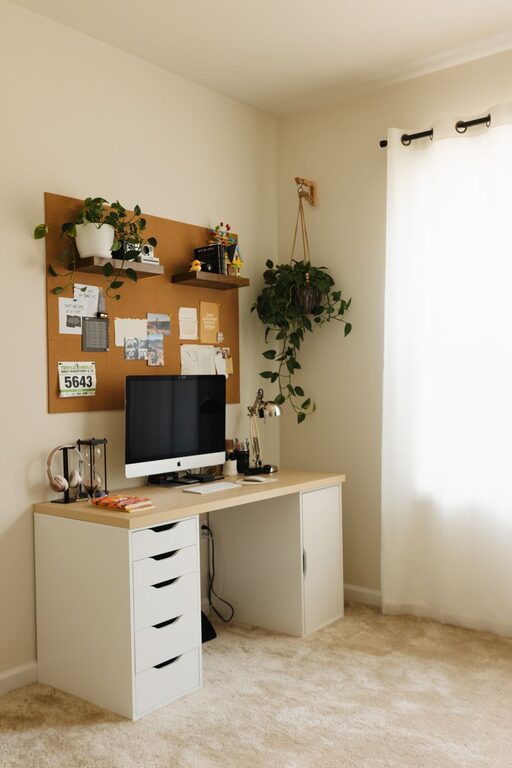
– Choose decor that reflects your style, such as plants, artwork, or photos.
– Use warm colors or soft textures like area rugs and cushions to create a cozy atmosphere.
– Add adjustable lighting options such as desk lamps or string lights to complement natural daylight and reduce glare.
Just be careful not to overcrowd the space, which can detract from productivity.
Manage Lighting Effectively
Proper lighting minimizes eye strain and energy dips.
– Position your desk so natural light comes from the side, not directly in front or behind your screen, to avoid glare.
– Use a mix of general overhead lighting and task lighting to brighten your workspace evenly.
– Opt for bulbs with a color temperature around 4000K-5000K, which mimics daylight and helps keep you alert.
Adjust brightness levels according to the time of day and task.
Optimize Technology Setup
Efficient technology setup saves time and frustration.
– Use a good quality monitor, keyboard, and mouse that suit your workflow.
– Manage cables with clips or sleeves to avoid tangles.
– Ensure your internet connection is stable and fast enough for video calls and cloud work.
– Backup your work regularly using external drives or cloud services.
Keeping technology organized and up-to-date supports smoother daily operations.
Establish Boundaries and Routines
Creating a cozy and functional workspace is not just about the physical setup but also habits.
– Set clear working hours to separate work time from personal time.
– Take regular breaks to stretch and rest your eyes.
– Communicate your workspace boundaries to others in your household.
A disciplined routine combined with a dedicated workspace enhances productivity and work-life balance.
Maintain Your Workspace
Regular upkeep keeps your workspace pleasant and effective.
– Clean your desk and equipment weekly.
– Rotate or refresh decor items to keep the environment inspiring.
– Review your storage and organization periodically to declutter.
A well-maintained workspace invites you to sit down and get to work with ease.
—
Final Thoughts
Creating a balanced home workspace requires a blend of comfort, functionality, and personal style. By carefully choosing your location, investing in ergonomic furniture, organizing efficiently, and managing lighting and technology, you can design a home office that supports your productivity and well-being. Remember to personalize your space and build routines that help you maintain clear boundaries between work and home life.
With these tips, your home workspace can become a productive and cozy retreat that makes remote work enjoyable and successful.